Every GM needs maps. Most map tools make you pay, sign up, or stay on a screen.
Run a tactical fight without a map and somebody always asks "wait — am I in range?" A grid answers it in a glance. But the tools to make that grid are a mess: the good desktop apps cost money and take a weekend to learn, the slick web ones paywall the export the second you try to actually use your map, and the VTTs assume you're playing online — when half of us are sitting around a real table with dice and minis.
So I built the one I wanted: the SWURPG Map Builder — a free, browser-based battle map maker with no signup to start, no paywall, and the part nobody else nails: it prints.
The difference: it prints to the actual table
Every cell is 5 ft in the fiction and 1 inch on paper — the same ~24 mm footprint as a LEGO minifig or a standard miniature base. Build your map, hit print, and you get a tiled PDF that spreads across as many letter-size pages as the map needs. Tape them together and you've got a full-size battle map your players drop real minis onto.
That's the wedge. Free map tools exist. Free tools that print to true miniature scale basically don't.
Here's one I built
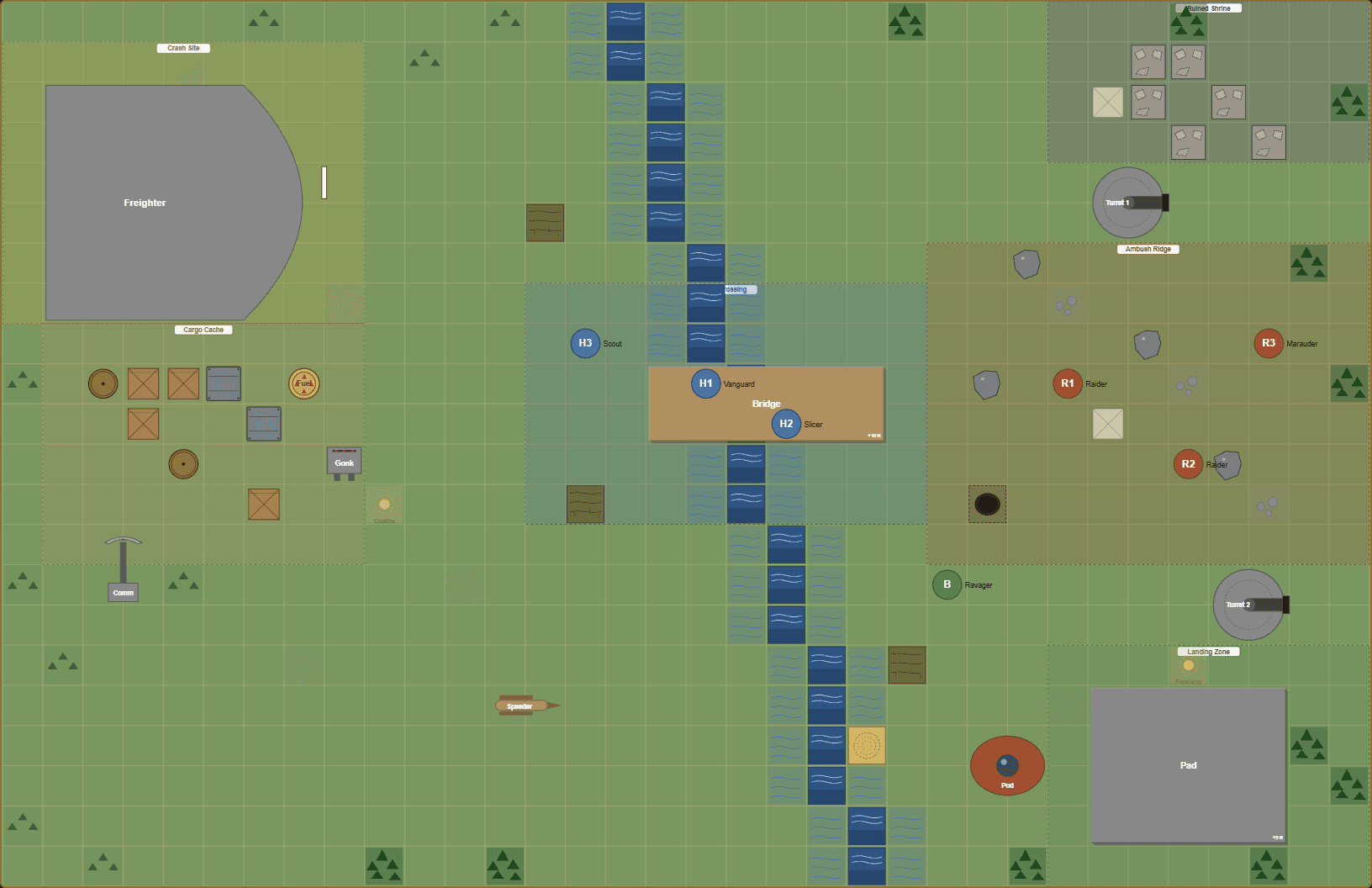
Meet Kessuria Ravine — Crash Site Ambush: a crashed freighter in a jungle river ravine that's become an ambush site — a rope bridge over rushing water, an enemy ridge bristling with auto-turrets and boulders, a ruined shrine, a downed escape pod, spilled cargo, and a firefight already in progress. It's a big, dense map, and it took minutes, not hours.
Open it to see what the tool actually outputs — every piece of terrain, every object, and a clean auto-generated legend. Signed in, you can fork it straight into your own builder and start editing.
What you can put on a map
- Terrain — 28+ kinds, grouped and one click each: water and deep water, forest and jungle, rocks, lava, swamp, quicksand, craters, ruins, crates and containers and barrels for cover, doors, hazards, light sources, and more. Cover tiers and save DCs come baked into the legend.
- Objects — multi-cell pieces with real silhouettes: furniture for interiors (beds, consoles, holotables), structural pieces (platforms, stairs, chasms), and themed props (freighters, turrets, comm arrays, escape pods, gonk droids, bacta tanks).
- Tokens — drop labelled discs for the PCs and the enemies, colour-coded, with name tags.
- Zones — shade and label whole areas ("Ambush Ridge," "Landing Zone") so the table reads at a glance.
- Multi-floor maps — add panels for separate floors or rooms and link them with stairs, ladders, and doors.
- An auto-legend that documents everything on the map as you build — no manual key-making.
Built for SWURPG. Works for any RPG.
The grid is plain 5-ft squares and the art is half generic terrain, half Star Wars flavour — so nothing stops you using it for D&D, Pathfinder, Daggerheart, or any grid-based system. A "crashed freighter" is a wrecked airship; a "comm array" is a wizard's tower; a turret is a ballista. Reskin freely. The map doesn't care what rules you roll.
How it works (about two minutes)
- Set your grid size and a background (jungle, sand, snow, concrete, ship steel…).
- Paint terrain straight onto the grid.
- Drop objects, tokens, and zones; nudge, resize, recolour.
- Print the tiled PDF for the table, or run it from a screen.
- Want to keep it? A free account saves your maps to the cloud and lets you share a link (or post it to the community gallery).
Make your next map — free
No subscription, no install, no "export locked" wall. Just open it and build.
- Open the Map Builder
- Browse community-shared maps for inspiration (or post your own)
- Want ready-to-run maps instead? Grab one from the battle map gallery.
Build the map, print it, put minis on it. That's the whole idea.